What Is GoHighLevel CSS? Complete Beginner Definition (2026)
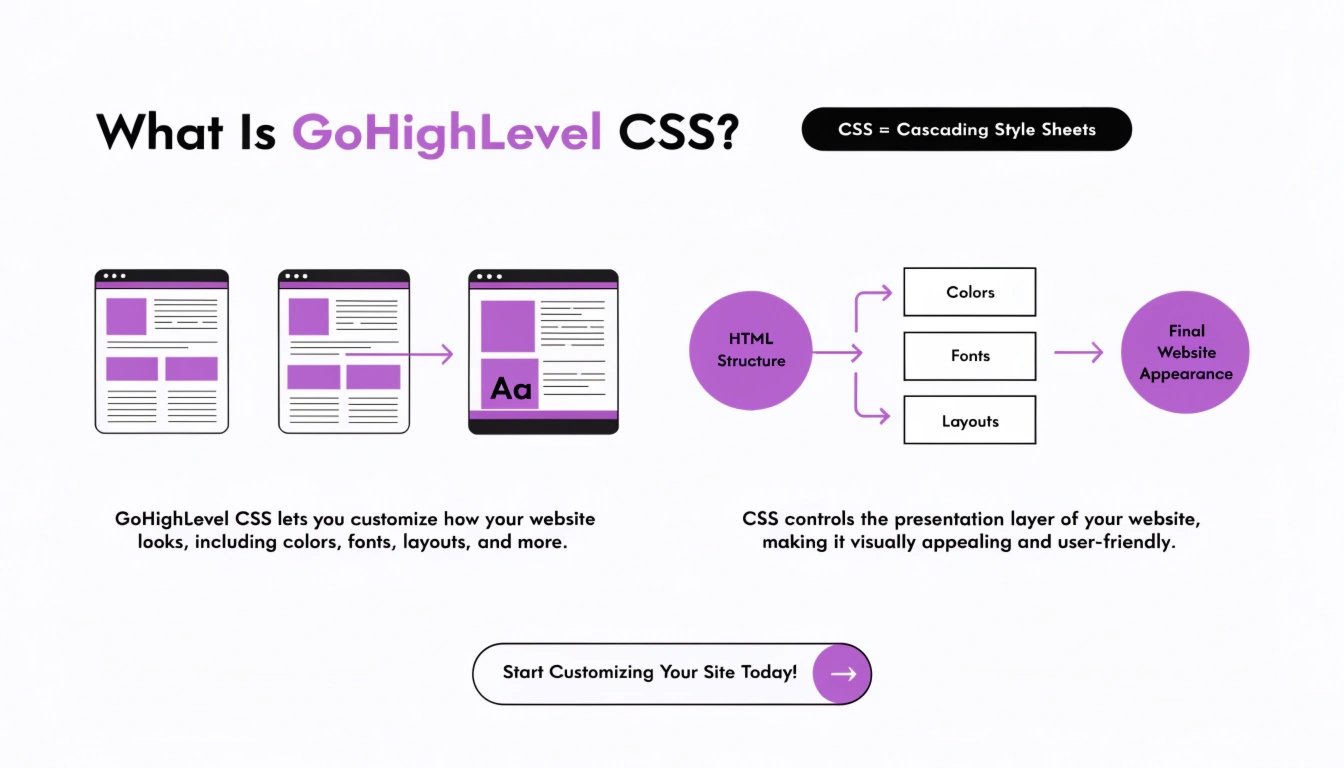
| GoHighLevel CSS is custom code, written in the Cascading Style Sheets language, that controls how your GoHighLevel funnels, websites, dashboards, and forms look. It overrides the default styling of the GHL drag-and-drop builder to give you control over colors, fonts, button shapes, spacing, animations, and responsive behavior. You paste it into the Custom CSS field inside GHL → Sites → Funnels → Settings, and it changes your design instantly. GoHighLevel CSS is what visually separates a generic, template-looking funnel from a branded, premium one — and it does not require advanced coding knowledge to use. |
What Is GoHighLevel CSS? (The Plain-English Definition)
GoHighLevel CSS is a set of styling rules you write or paste into your GoHighLevel account to control exactly how your pages look. Think of GoHighLevel as a house: the drag-and-drop builder is the framing and rooms (structure), while CSS is the paint, wallpaper, furniture, and lighting (appearance). You can have a functional house with default GHL styling, but it will look the same as every other GHL house — because every coach starts with the same template options.
In our experience working with 100+ coaches at ghlcss.com, the #1 reason a GHL funnel looks generic is that the user hasn’t added a single line of CSS. The default builder gets you 70% of the way to a professional page; CSS closes the final 30% that buyers notice within the first three seconds.
| Don’t want to learn CSS yourself? Our CSS Snippet Service delivers production-ready custom CSS for any GHL element in 24 hours — just $47, no coding needed on your end. |
What Does CSS Stand For?
CSS stands for Cascading Style Sheets. It’s a web standard developed in 1996 and used on essentially every modern website. The word “cascading” means rules can flow from general to specific — you can set a default style for all buttons on your funnel, then override it for one specific button.
GoHighLevel didn’t invent CSS. It just gives you a place to paste it. The same CSS language works on WordPress, Squarespace, Webflow, Shopify, and any other website builder.
In practice, a piece of GoHighLevel CSS looks like this:
| /* Style every button on the funnel */ .ghl-btn { background: #0A2540; color: #ffffff; border-radius: 8px; padding: 14px 30px; } |
That’s it. Three things to know: a selector (which element to style — here, .ghl-btn), curly braces, and declarations inside (color, padding, etc.).
How GoHighLevel CSS Actually Works
When you paste CSS into GoHighLevel, here’s what happens behind the scenes:
This last point is what makes GoHighLevel CSS so powerful for non-coders: you can experiment, see the result instantly, and undo with one click if something looks wrong.
Where Do You Paste CSS in GoHighLevel?
GoHighLevel has three places where CSS can go, depending on how widely you want it to apply:
| Location | Where to find it | Best for |
| Funnel-level CSS | Sites → Funnels → your funnel → Settings → Custom CSS | Styles every page in one funnel |
| Page-level CSS | Inside the page editor → Page Settings → Custom CSS | Styles for just one page |
| Element-level CSS | Click any element → Advanced → Custom CSS class | Targeted styling for one block |
For most coaches, funnel-level CSS is the right place to start. It keeps all your styles in one spot and applies them consistently across your opt-in, sales, booking, and thank-you pages.
What Can You Do With GoHighLevel CSS?
Almost anything visual on a GHL page can be customized with CSS. The most common uses for coaches and consultants include:
For a list of real CSS upgrades worth applying to your funnel, see our GHL custom CSS for non-coders guide.
5 Simple GHL CSS Examples for Beginners
Here are five beginner-friendly snippets you can paste into your funnel right now. Each is fully self-contained.
Example 1: Change every button color
| .ghl-btn, .c-button { background: #0A2540; color: #ffffff; border-radius: 8px; } |
Example 2: Add a hover lift to buttons
| .ghl-btn:hover { transform: translateY(-2px); transition: transform 0.15s ease; } |
Example 3: Make all headings use a serif font
| h1, h2, h3 { font-family: ‘Georgia’, serif; letter-spacing: -0.3px; } |
Example 4: Hide the GoHighLevel chat widget
| #lc_chat_widget, .lc-chat-widget { display: none !important; } |
Example 5: Add a soft shadow to images
| img { border-radius: 12px; box-shadow: 0 10px 30px rgba(0,0,0,0.08); } |
Each of these is fully editable. Change the colors, sizes, or selectors to match your brand. If a snippet isn’t working, the issue is almost always the selector — see our GHL CSS selectors guide for the fix.
What You Can’t Do With GoHighLevel CSS
CSS is powerful but limited. It controls how things look, not how things work. Here’s what CSS cannot do inside GoHighLevel:
- Change form behavior (submit logic, validation) — that’s JavaScript
- Modify automation triggers or workflows
- Add new functionality like quizzes or calculators
- Change the underlying HTML structure of GHL pages
- Integrate with third-party tools or APIs
For those use cases, you’ll need custom HTML (allowed in GHL’s Custom Code blocks) or JavaScript. CSS is just one layer of customization — the visual one.
Do You Need to Know How to Code?
Short answer: no. Most GoHighLevel CSS work is copy-paste. You find a snippet that does what you want, paste it into the Custom CSS field, and save. You’ll learn the basics naturally as you go.
That said, the more you understand the basics, the more you can adjust snippets to fit your exact needs. The three concepts worth understanding even at a beginner level:
- Selectors — the part before the curly braces, like .ghl-btn or h1. Tells the browser which element to style.
- Properties — the thing being changed, like background, color, padding.
- Values — the new setting, like #0A2540 or 14px.
That’s 80% of what beginners need. Everything else is variations on these three building blocks.
| Want CSS done for you instead? If learning CSS isn’t worth your time, our Funnel CSS Makeover service is $197 flat and delivers a fully styled funnel in 48 hours. |
GoHighLevel CSS vs. Custom HTML vs. JavaScript
Coaches often confuse these three. Here’s the difference in plain terms:
| Tool | What it controls | When to use it |
| CSS | How things look (colors, fonts, spacing) | Style your funnel to match your brand |
| HTML | What things are (text, images, sections) | Add custom content blocks the GHL builder can’t make |
| JavaScript | How things behave (clicks, popups, calculators) | Add interactive features like quizzes or timers |
For most coaching funnels, CSS is the only one of these you’ll ever need. If you’re hiring a designer and they tell you something requires JavaScript, ask whether it really does — about 80% of “it needs JavaScript” requests can actually be solved with CSS alone.
How to Learn GoHighLevel CSS (Beginner Path)
If you want to actually learn CSS for GoHighLevel, here’s the shortest path:
- Start with copy-paste snippets. Use guides like this one and our full CSS for non-coders guide. Paste, save, see what happens.
- Learn to find selectors. Right-click any element in your GHL page → Inspect Element. The class names are right there.
- Use a CSS reference. MDN Web Docs is the gold standard. Search “MDN CSS property name” anytime you don’t know what something does.
- Build a personal snippet library. Keep a text file of CSS snippets that worked for you. Reuse them across funnels.
- Practice on your own funnels first. Don’t learn CSS on a paying client’s funnel. Make a test funnel and break it freely.
Most coaches reach “good enough to style their own funnels” within 4–6 weeks of casual learning.
Frequently Asked Questions
What is GoHighLevel CSS in simple terms?
GoHighLevel CSS is custom code that controls how your GHL pages look — colors, fonts, buttons, spacing, and animations. You paste it into the Custom CSS field inside your funnel settings, and it changes the design instantly. In simple terms: it’s the layer that makes your funnel look unique instead of like every other GHL template.
Does GoHighLevel allow custom CSS?
Yes, GoHighLevel allows custom CSS in three places: funnel-level (Sites → Funnels → Settings → Custom CSS), page-level (inside the page editor), and element-level (via Advanced → Custom CSS class). All paid GoHighLevel plans support custom CSS, including the lowest Starter tier.
Is GoHighLevel CSS the same as regular CSS?
Yes, GoHighLevel CSS is the same Cascading Style Sheets language used on every modern website. There is no special “GHL version” of CSS. The only thing unique to GoHighLevel is the specific class names and selectors used inside the GHL page structure — those vary by element type and platform updates.
Do I need to know coding to use GoHighLevel CSS?
No, you don’t need to know coding to use GoHighLevel CSS. Most coaches paste pre-written snippets from guides like ours and adjust the colors and sizes to match their brand. Understanding three concepts — selectors, properties, and values — covers 80% of beginner needs.
Where can I find GoHighLevel CSS examples?
You can find GoHighLevel CSS examples on specialist blogs like ghlcss.com, in GoHighLevel community Facebook groups, on YouTube tutorial channels, and in dedicated guides covering buttons, fonts, mobile responsiveness, and full sales page CSS. Most working snippets are copy-paste ready.
Will custom CSS break when GoHighLevel updates?
GoHighLevel updates can occasionally break custom CSS, usually when class names change in the platform. This happens to roughly 5–10% of custom CSS each year. Fixes typically take 5–15 minutes once you identify the new selector. Specialists who offer platform-update warranties handle this automatically for clients.
What’s the difference between GHL CSS and a GHL template?
A GoHighLevel template is a pre-built page structure with default styling. GHL CSS is the custom code you add on top to change how that template looks. A template gives you the layout; CSS makes it match your brand. Most coaches start with a template and then add 50–200 lines of CSS to polish it.
Conclusion: CSS Is the Difference Between Default and Premium
GoHighLevel CSS is the most accessible customization tool inside the platform — powerful enough to transform a default funnel into a premium-feeling one, and simple enough that any coach can use it with copy-paste snippets. You don’t need to learn to code. You don’t need a developer. You just need to know where to paste, which selectors to target, and which snippets actually work.
Start with the 5 beginner examples above. Apply them to a test funnel. Watch what changes. Within an hour, you’ll have a working mental model of what GoHighLevel CSS is and what it can do for your business.
| Skip the learning curve entirely. If you’d rather have professional CSS applied without learning to do it yourself, ghlcss.com offers flat-rate services from $47 for a single CSS fix to $497 for a full custom funnel. Transparent pricing, 24–72 hour turnaround. See all services and pricing → |